Optimizing your DJ workflow cuts set preparation time by 40% and eliminates performance anxiety. I’ve spent 12 years refining my system, and I can tell you that 90% of DJs waste hours on chaotic prep because they lack a repeatable workflow. They scramble before gigs, forget crucial tracks, and panic when equipment acts up. Here’s the truth nobody talks about: your workflow matters more than your gear. I’ve watched bedroom DJs with $500 controllers destroy pros with $10,000 setups because their preparation system was bulletproof.
The 3 Core DJ Workflow Phases That Separate Pros From Amateurs
My workflow has three distinct phases. Each phase serves a specific purpose and must happen in order. Skip one, and your entire system collapses under pressure.
Phase one is acquisition and analysis. You discover new tracks, import them into your library, analyze BPM and key, then tag everything correctly. This happens during your downtime, never before a gig.
Phase two is curation and preparation. You build playlists for specific venues, create energy maps, set hot cues and loops, then export everything to USB drives. This happens 2 to 3 days before your performance.
Phase three is performance and adaptation. You execute your prepared set while reading the room, make real-time adjustments, then record everything for later analysis. This is where your workflow either holds strong or crumbles.
Most DJs jump straight to phase three without building the foundation. They show up at gigs scrolling through thousands of tracks, trying to remember which version of that tech house anthem they wanted to play. That’s not DJing, that’s panic with a soundtrack.
Phase 1: Building a DJ Music Library That Actually Works
Your library is your creative palette. Organize it wrong, and you’ll spend 15 minutes searching for tracks mid-set. I learned this at a warehouse party when I couldn’t find my closing track. The crowd started leaving while I frantically scrolled through 8,000 files.
My Folder Structure That Speeds Up Track Selection
I keep my main folders broad and permanent. No micro-genres, no complicated nesting, no clever naming schemes that make sense only to you. Here’s my exact structure:
HOUSE (115 to 125 BPM)
TECH HOUSE (123 to 128 BPM)
TECHNO (128 to 135 BPM)
BASS HOUSE (125 to 130 BPM)
BREAKS (130 to 140 BPM)
DRUM AND BASS (160 to 180 BPM)
HIP HOP (80 to 100 BPM)
EDITS (All Genres)
CLASSICS (Timeless Tracks)
NEW (Last 30 Days)
This system works on any platform. Rekordbox, Serato, Traktor, or even just Finder. The folder names mirror my Serato crates exactly, so my brain processes navigation instantly.
Track Analysis: The Non-Negotiable First Step
Every single track gets analyzed before entering my library. BPM detection, key detection, beatgrid verification, and waveform analysis all happen immediately. I use Rekordbox for this because Pioneer gear dominates club setups.
Run auto-analysis first, then spot-check every beatgrid manually. Auto-detection fails on 20% of tracks, especially older recordings, live edits, or anything with tempo changes. Play the first 16 bars and watch your phase meter. If it drifts, your beatgrid is wrong.
Set your first downbeat accurately. This anchor point controls everything else. Play from the beginning, identify where the kick drum actually starts, and drop your first beatmarker precisely on that transient.
Tagging System That Saves 30 Minutes Per Gig
I use smart tagging to slice my library multiple ways. Genre folders give me broad categories, but tags let me find exactly what I need in 5 seconds.
My tag categories:
- Energy Level: Warmup, Builder, Peak, Cooldown
- Mood: Dark, Uplifting, Groovy, Aggressive, Melodic
- Function: Opener, Transition, Banger, Closer, Emergency
- Crowd Type: Club, Festival, Wedding, Corporate, Underground
- Tested Status: Untested, Club Tested, Crowd Killer, Never Again
Tag everything immediately after analysis. Wait a week, and you’ll forget which tracks deserve what labels. A properly tagged library lets you build entire setlists in under 10 minutes.
| Organization Method | Setup Time | Search Speed | Flexibility | Best For |
|---|---|---|---|---|
| Folder Structure Only | Low | Slow | Low | Small libraries under 500 tracks |
| Playlists Only | Medium | Medium | Medium | Prepared sets and radio shows |
| Smart Crates/Tags | High | Fast | High | Large libraries over 2,000 tracks |
| Hybrid System | High | Very Fast | Very High | Professional multi-genre DJs |
Phase 2: Set Preparation That Eliminates Guesswork
Most DJs either over-prepare rigid playlists or under-prepare and wing it completely. Both approaches fail. You need a flexible framework, not a prison.
Creating Energy Maps For Every Venue Type
I sketch a simple energy curve before building any setlist. Time runs horizontal, energy runs vertical. Club sets look different from festival sets, which look different from warmup slots.
For a 90-minute club peak slot (midnight to 1:30am):
0 to 15 minutes: Start at 70% energy, establish your sound
15 to 30 minutes: Build to 85%, introduce bigger tracks
30 to 60 minutes: Maintain 90 to 95%, this is prime time
60 to 75 minutes: Peak at 100%, drop your biggest weapons
75 to 90 minutes: Cool to 80%, set up the next DJ
For a festival opener (2pm to 3pm):
0 to 20 minutes: Start at 40%, warm grooves only
20 to 40 minutes: Build gradually to 60%
40 to 60 minutes: Peak at 70%, save headroom for later DJs
Every venue has its own arc. Playing peak energy at 11pm in a club that doesn’t fill until midnight kills the vibe. I made this mistake at my first residency and cleared the dancefloor.
My Playlist Building Method
I create three playlists for every gig: Main, Alternate, and Emergency.
Main playlist contains 60 to 80 tracks for a 90-minute set. That’s double what I’ll actually play. This gives me options without overwhelming choice. Each track gets a hot cue at the intro, breakdown, drop, and outro.
Alternate playlist contains 20 tracks that work if the crowd leans different than expected. If my tech house crowd wants deeper vibes, I pivot here.
Emergency playlist contains 10 to 15 absolute bangers that work in any situation. These are my “oh shit” tracks when energy dips unexpectedly or technical problems eat time.
Hot Cue Strategy That Speeds Transitions
I set four hot cues on every track. Consistent cue placement across your entire library creates muscle memory.
Cue 1 (Red): Intro start, first kick drum
Cue 2 (Blue): Breakdown or verse section
Cue 3 (Green): Main drop or peak energy moment
Cue 4 (Yellow): Outro start, last 32 bars
These four points let me jump anywhere instantly. Mix from intro to intro for smooth blends. Drop from breakdown to breakdown for energy shifts. Jump straight to the drop when you need impact fast.
I also set one loop on every track at the outro. Eight-bar loops work for most electronic music. This gives me infinite mixing time if my next track selection takes longer than expected.
The Dual USB System
I bring two identical USBs to every gig. Both contain my full library and all my prepared playlists. USB failure has killed more DJ sets than bad mixing ever will.
Format both drives as FAT32 for maximum compatibility. exFAT works on newer gear but fails on older CDJs. Always test both USBs on your home setup before leaving.
Label your USBs with your DJ name. Sounds obvious, but I’ve grabbed the wrong USB from a pile of identical drives more times than I’ll admit.
| Preparation Element | Time Investment | Performance Impact | Priority Level |
|---|---|---|---|
| Energy mapping | 15 minutes | High | Critical |
| Track selection | 45 to 60 minutes | Very High | Critical |
| Hot cue placement | 90 to 120 minutes | High | Important |
| USB backup creation | 10 minutes | Critical if needed | Critical |
| Playlist rehearsal | 60 to 90 minutes | Medium | Recommended |
Laptop Optimization For Zero Performance Issues
Your laptop is a performance tool, not a productivity machine. Treat it like a race car, not a family sedan. Disable everything that doesn’t directly support your DJ software.
Windows Optimization Steps
Set power plan to High Performance. Go to Control Panel, Power Options, select High Performance. Set sleep mode to Never. Windows Update crashing your set at 1am is career suicide.
Disable automatic updates completely. Open Settings, Update and Security, Advanced Options, pause updates for 35 days. Repeat this process before every gig.
Close every background application. Dropbox, Spotify, Chrome, Discord, all of it. Check your system tray and kill processes manually. Background apps steal CPU cycles and cause audio dropouts.
Disable WiFi and Bluetooth during performance. Airplane mode works, or disable adapters completely in Device Manager. Wireless interference causes crackling and latency spikes.
Adjust processor scheduling for programs. Right-click This PC, Properties, Advanced System Settings, Performance Settings, Advanced tab, select Programs under processor scheduling.
Mac Optimization Steps
Disable automatic updates. System Preferences, Software Update, uncheck “Automatically keep my Mac up to date.” macOS updates at the worst possible times.
Turn off Bluetooth and WiFi. Use the menu bar icons or enable Airplane Mode in Control Center.
Close all background apps. Command-Tab through running applications and quit everything except your DJ software and any required utilities like iShowU or OBS if you’re streaming.
Disable Spotlight indexing during performances. Open Terminal and run “sudo mdutil -a -i off”. Re-enable it after your gig with “sudo mdutil -a -i on”.
Use Activity Monitor to identify CPU hogs. Sort by CPU percentage and force-quit anything suspicious.
Audio Interface Buffer Settings
Lower buffer size reduces latency but increases CPU load. Higher buffer size increases latency but provides more stability. For live performance, I use 256 or 512 samples.
Test your system before every gig. Play two tracks simultaneously with effects and EQ changes. If you hear crackling or dropouts, increase your buffer size. If latency feels sluggish, decrease buffer size.
Most DJ software lets you adjust buffer size in audio preferences. Rekordbox, Serato, and Traktor all have this option. Find your sweet spot and never change it mid-performance.
Phase 3: Performance Execution and Real-Time Adaptation
Your preparation means nothing if you can’t execute under pressure. Club environments are hostile: loud, hot, crowded, with drunk people bumping your gear constantly.
The First 15 Minutes Make or Break Your Set
I arrive 30 minutes before my set time. This gives me time to set up properly without rushing. Rushing causes mistakes.
Test everything immediately. Plug in your USBs, load a track, make sure audio comes through, check your headphone volume, verify monitor speakers work. Assume nothing works until you’ve confirmed it personally.
Reset all mixer controls. The previous DJ probably left filters engaged, EQs cranked, or effects running. Turn everything to neutral: EQs at 12 o’clock, filters off, crossfader disabled if you don’t use it.
Load your first track on both decks. Have your opening transition ready to go before the previous DJ finishes. This eliminates dead air and shows professionalism.
Reading The Room: The Skill Nobody Teaches
Watch the dancefloor constantly. Are people moving? Standing still? Leaving? Getting drinks? The crowd tells you everything if you actually look at them.
Empty dancefloor after your last drop? That track didn’t work. Mental note: never play it again or try it earlier next time.
People rushing to the floor during your intro? You picked right. Play more tracks with that same energy and vibe.
Crowd standing around watching? They need permission to dance. Play something familiar or energetic to break the ice.
I glance at the floor every 30 seconds. Not staring, just checking. This real-time feedback loop guides every decision.
Handling Technical Problems Without Panic
Something always goes wrong. USB errors, audio dropouts, mixer malfunctions, or your own mistakes. Your reaction determines whether the crowd notices.
No audio from a deck? Check the channel fader first, then trim knob, then EQs, then filter. 80% of “no sound” problems are mixer settings, not actual failures.
USB not reading? Unplug it, wait 3 seconds, plug it back in. If that fails, use your backup USB immediately. Don’t waste time troubleshooting the first one.
Software crash? This is why you bring two USBs. Restart your laptop if needed, but keep the music playing from your backup USB on the CDJs.
Wrong track loaded? Transition out immediately using your current track’s outro loop. Load the correct track, beatmatch it properly, then mix in. Never let a mistake play longer than necessary.
Recording and Analyzing Your Sets
I record every single performance. Club sets, house parties, practice sessions, everything. You can’t improve what you don’t measure.
My Recording Setup
I use a Tascam DR-40X connected to the mixer’s REC OUT. This captures my mix independently from my laptop, so technical issues don’t kill my recording.
Set recording levels to peak at -12dB to -6dB. Never let your recording hit 0dB or you’ll capture distortion that wasn’t present in the live sound.
Use WAV format at 44.1kHz/16-bit. The DR-40X records to SD cards, and a 32GB card holds about 12 hours of WAV audio.
Post-Gig Analysis Process
I listen to my recordings within 24 hours while the performance is fresh in my memory. I take notes on:
- Transitions that felt smooth versus ones that clashed
- Tracks that got strong crowd reactions
- Moments where energy dipped unexpectedly
- Technical mistakes and how I recovered
- Timing issues with phrasing or beatmatching
This feedback loop improved my mixing faster than any course or tutorial. Hearing your own mistakes forces you to fix them.
Advanced Workflow Tools That Multiply Your Efficiency
Once your basic workflow is solid, these tools take it further.
DJ.Studio For Timeline-Based Set Preparation
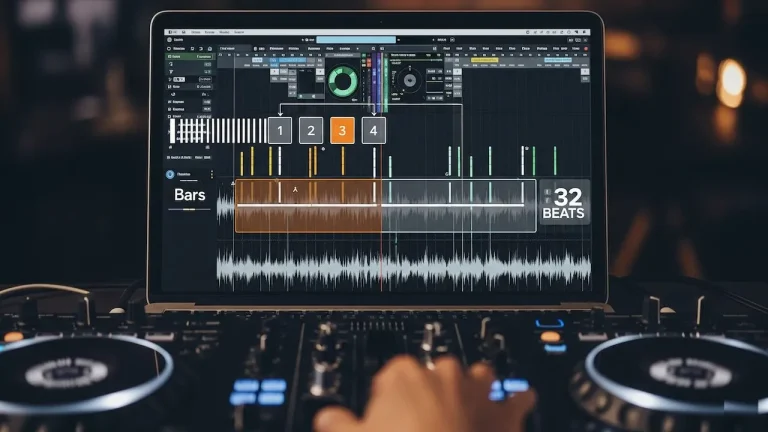
DJ.Studio changed how I prepare radio mixes and promo sets. It shows your entire mix as a timeline, like a DAW for DJs. You can see energy curves, key changes, and transition points visually.
Import your Rekordbox library directly into DJ.Studio. Use the Automix feature to generate a harmonically-mixed setlist automatically, then adjust manually. This gives you a solid starting point in 5 minutes versus 45 minutes of manual curation.
Export your finished project back to Rekordbox or directly to Ableton Live for further production work. I use this workflow for mix series and podcast preparation.
Mixed In Key For Harmonic Mixing
Mixed In Key analyzes your tracks’ musical keys and suggests compatible matches. Harmonic mixing prevents key clashes and makes transitions sound more musical.
The Camelot Wheel system works perfectly. Tracks in the same key mix together flawlessly. Move one position clockwise or counterclockwise for smooth energy changes. Jump across the wheel (from 8A to 8B) to shift from minor to major while maintaining the same root key.
I don’t follow harmonic mixing religiously, but it guides my track selection during preparation. Musical compatibility matters more than just BPM matching.
Smart Crates In Serato
Smart Crates automatically populate based on rules you set. Create a crate for “Tech House, 125-128 BPM, Added Last 30 Days” and it updates itself whenever you add matching tracks.
I have Smart Crates for:
- New additions this month
- Peak energy tracks by genre
- Warm-up friendly grooves
- Tracks I haven’t played in 3+ months
- Emergency bangers (crowd savers)
These automated collections save manual playlist maintenance and surface tracks you’d otherwise forget.
| Workflow Tool | Primary Function | Cost | Best Use Case |
|---|---|---|---|
| DJ.Studio | Timeline editing and automix | $9.99/month | Radio shows and promo mixes |
| Mixed In Key | Harmonic analysis | $58 one-time | Key-based track selection |
| Rekordbox (Pro Plan) | Library management and performance | $9.99/month | Pioneer CDJ preparation |
| Serato DJ Pro | Performance and Smart Crates | $10/month or $299 lifetime | Controller and DVS setups |
Common Workflow Mistakes That Kill Your Momentum
I’ve made every single one of these errors. Learn from my failures.
Mistake 1: Over-Preparing Rigid Playlists
New DJs create hour-long playlists and play them front-to-back regardless of crowd reaction. This is a script, not a DJ set. Prepare frameworks, not prison sentences.
Build your main playlist with 2X the tracks you need. Include alternates. Mark pivot points where you can shift direction if needed.
Mistake 2: Ignoring Phrasing
Key and BPM matching mean nothing if you mix verse over chorus. Electronic music is built in 32-bar phrases. Your transitions should align these phrases for musical coherence.
Count the phrasing while practicing at home. Most tracks follow 32-bar intro, 32-bar breakdown, 32-bar drop, 32-bar outro. Mix on these boundaries, not randomly.
Mistake 3: Single USB Dependency
USBs fail constantly. Contacts corrode, files corrupt, drives get damaged. A single USB is Russian roulette with your career.
Always bring two identical USBs. Test both before leaving home. Spending $30 on a backup USB saves you from career-ending disasters.
Mistake 4: Last-Minute Library Changes
Adding tracks to your library 2 hours before a gig is gambling. Those tracks might have wrong beatgrids, incorrect keys, or play at different volumes.
Finalize your setlist 2 days before performance. New track discoveries go into a “Next Gig” folder, not tonight’s playlist.
Mistake 5: Not Testing Gear Before Performance
I watched a DJ spend 20 minutes troubleshooting a laptop connection issue because he didn’t test his setup beforehand. The previous DJ had to play extended while this guy panicked.
Arrive early. Test everything. Assume nothing works until proven otherwise. Professional preparation looks boring until amateur unpreparedness looks disastrous.
Building Your Practice Routine
Workflow optimization requires consistent practice. I practice 10 hours weekly even after 12 years of DJing. Skills deteriorate without maintenance.
My Weekly Practice Schedule
Monday: 90 minutes of new track discovery and library management
Tuesday: Off
Wednesday: 2 hours practicing specific techniques (effects, transitions, scratching)
Thursday: Off
Friday: 2 hours building and rehearsing weekend setlists
Saturday: Performance (if booked)
Sunday: 90 minutes reviewing recordings and analyzing mistakes
This schedule prevents burnout while maintaining sharp skills. Daily practice leads to fatigue and diminishing returns.
Specific Skills To Practice
Beatmatching without looking at BPM displays. Cover your screen and use only your ears. This skill saves you when beatgrids fail.
Phrasing transitions on 32-bar boundaries. Load two random tracks, identify their phrase structures, then mix them cleanly.
Hot cue jumping and loop manipulation. Practice jumping between cue points seamlessly while maintaining rhythm.
EQ isolation and filter sweeps. Learn how much low-end removal prevents muddy mixes. Experiment with high-pass filter transition techniques.
Each practice session should focus on one specific skill. Trying to improve everything simultaneously improves nothing.
Frequently Asked Questions
How long does proper DJ set preparation take?
Plan 2 to 3 hours for complete set preparation, including track selection (45 to 60 minutes), hot cue placement (60 to 90 minutes), and USB backup creation (10 minutes). Experienced DJs with well-organized libraries can reduce this to 90 minutes. Never prepare sets the same day as your performance, as rush preparation leads to mistakes.
Should I prepare my entire DJ set track-by-track or improvise?
Neither extreme works well. Prepare a flexible framework with 2X more tracks than needed. Build your main playlist with 60 to 80 tracks for a 90-minute set, include alternate options for different crowd reactions, and mark pivot points where you can change direction. This approach combines preparation benefits with improvisation flexibility.
Which DJ software has the best workflow optimization features?
Rekordbox excels for Pioneer CDJ preparation with USB export and cloud sync features. Serato DJ Pro offers superior Smart Crates for automatic library organization. DJ.Studio provides timeline-based editing for radio mixes and promo sets. Choose based on your performance environment: Rekordbox for club CDJs, Serato for controller setups, or DJ.Studio for production-style preparation.
How many USBs should professional DJs bring to gigs?
Always bring two identical USBs formatted as FAT32. USB drives fail regularly due to corrupted files, physical damage, or connection issues. Both drives should contain your complete library and all prepared playlists. Test both USBs before leaving home. Label them with your DJ name to avoid confusion in club booths with multiple DJs.
What laptop specifications do I need for stable DJ performance?
Minimum requirements include an Intel i5 or AMD Ryzen 5 processor, 8GB RAM (16GB recommended), and a solid-state drive (SSD). Processor speed and RAM matter more than graphics cards for DJ software. MacBooks handle audio processing more efficiently than most Windows laptops. Always set your power plan to High Performance and disable automatic updates before performances.
How do I recover from technical failures during live performances?
Stay calm and troubleshoot systematically. For no audio issues, check channel faders, trim knobs, EQ settings, and filters before assuming equipment failure. Keep your backup USB ready and loaded with emergency tracks. If your primary system fails completely, switch to your backup USB immediately. Practice troubleshooting scenarios at home so you can handle them confidently during live sets.
Should I use harmonic mixing in my DJ workflow?
Harmonic mixing improves musical compatibility but shouldn’t restrict your creativity. Use key information as a guide, not a rule. Tracks in the same Camelot key mix perfectly together. Moving one step clockwise or counterclockwise provides smooth energy shifts. Tools like Mixed In Key or Rekordbox’s key analysis help identify compatible tracks during preparation. Energy and crowd response matter more than perfect key matching.
Y2mate offers comprehensive DJ learning resources for optimizing your workflow and mastering performance techniques.